Tlemcen Car electronics  

Précédent   Tlemcen Car electronics > Tableau de bord, Habitacle & securité conducteur > Autoradio et Navigateur GPS
S'inscrire FAQ Communauté Donate

Autoradio et Navigateur GPS Astuce, dump, aide pour décodage d'autoradio et navigateur.

Blackfriday
Réponse
 
Outils de la discussion Rechercher
Vieux 23/04/2022, 15h46   #1
Aleksey-MS
Membre accro
 
Avatar de Aleksey-MS
 
Date d'inscription: juin 2021
Localisation: France, Nice
Âge: 39
Messages: 1 321
Thanks: 2
Thanked 3 701 Times in 1 091 Posts
Pouvoir de réputation: 46
Aleksey-MS has a reputation beyond reputeAleksey-MS has a reputation beyond reputeAleksey-MS has a reputation beyond reputeAleksey-MS has a reputation beyond reputeAleksey-MS has a reputation beyond reputeAleksey-MS has a reputation beyond reputeAleksey-MS has a reputation beyond reputeAleksey-MS has a reputation beyond reputeAleksey-MS has a reputation beyond reputeAleksey-MS has a reputation beyond reputeAleksey-MS has a reputation beyond repute
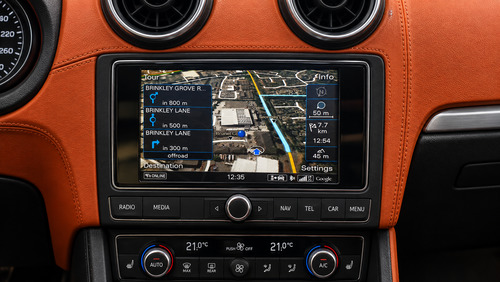
Par défaut Audi MMI3G High (HNav) MMI 3GP (HN+) 6.33.1 + Activator Europe 2021-2022

[size=large]Audi MMI3G High (HNav) MMI 3GP (HN+) 6.33.1 8R0051884JD - 2021/2022 + Activator Europe [/size]

[size=large]Car list:[/size]
  • [size=large]A1[/size]
  • [size=large]A4 S4 B8 2008 -[/size]
  • [size=large]A4 ALLROAD 2010 -[/size]
  • [size=large]A5 S5 CAB 2010 -[/size]
  • [size=large]A5 S5 COUPE/SPORTBACK 2008 -[/size]
  • [size=large]A6 S6 2009 -[/size]
  • [size=large]A6 ALLROAD 2007 -[/size]
  • [size=large]A7[/size]
  • [size=large]A8 S8 2008 -[/size]
  • [size=large]Q3[/size]
  • [size=large]Q5 2009 -[/size]
  • [size=large]Q7 2010 -[/size]
  • [size=large]RS5 2010 -[/size]
  • [size=large]RS6 2008, 2011[/size]
[size=large]Please take into account the following:[/size]
  • [size=large]For HN+ SYSTEMS and to be able to copy the maps on SDHC 32GB CARD the following FOLDER has to be DELETED under folder \pkgdb\ DELETE LIT1-3.[/size]
  • [size=large]For HNav SYSTEMS and to be able to copy the maps on SDHC 32GB CARD the following FOLDER has to be DELETED under folder \pkgdb\ DELETE LIT3GP1-4.[/size]
  • [size=large]Use WinRAR 5.8 or newer.[/size]
Firmware update

[size=large]For those with a BOSE system[/size]
[size=large]You cannot update the BOSE amplifier. By up****** BOSE - you can get a lot of problems with subsequent settings and parameterization of BOSE. What should be done?[/size]
  1. [size=large]Remove all connectors and wires from the BOSE amplifier.[/size]
  2. [size=large]Pull out the optics connector.[/size]
  3. [size=large]Loop the pulled out optical connector with a plug with an optical ring for the MOST optical bus (part No. 4E0973802).[/size]
[size=large]- We downloaded the necessary firmware and begin to install it in increasing order. First, you need to unzip the downloaded archives using WinRar. Then, if there was an ISO file in the archive, then either write it to a CD or copy the contents of the image to the root of the SD card (using WinRar).[/size]

[size=large]- Next, insert your media (CD or SD) into the head of the MMI. Everything is ready for up******.[/size]
[size=large]Important! The update takes about 40 minutes, so it’s recommended to either start the car or connect an additional charger to the battery during the update.[/size]
  1. [size=large]Hold SETUP + RETURN until the version of your firmware appears.[/size]
  2. [size=large]We select a source from which we will be updated.[/size]
  3. [size=large]We see the firmware version to which we will update click on it.[/size]
  4. [size=large]Choose a standard.[/size]
  5. [size=large]We see a list of what we will have and what will not be updated. We go down and click Start download.[/size]
  6. [size=large]Here we are told that the process should not be interrupted. Therefore, it is advisable to either start the car or connect to additional power, in order to be sure that the battery does not sit down during the firmware. If ready - then click Start.[/size]
  7. [size=large]The update process has begun. During the upgrade, MMI will reboot.[/size]
  8. [size=large]And so the update has completed and we see the list. Opposite each block should be either OK or -. Scroll down and click Continue.[/size]
  9. [size=large]Check the firmware version and see that the version has been successfully updated![/size]
[size=large]Card Installation[/size]

[size=large]Here is the same as with the update. Copy the cards to the root of the memory card. Insert the card into MMI. Press SETUP + RETURN and perform the same actions as during the update. Cards will be loaded for several hours, so be patient. After the cards are loaded, they will work for 5 minutes and will be blocked. Then you need to activate. Unzip the previously downloaded archive with the card activator and put it in the root of the memory card. Next is the usual update procedure. Press SETUP + RETURN, etc.[/size]

[size=large]If you have problems installing the cards, you can first remove the old cards from the MMI hard drive, and then install new ones. How to do this, read on.[/size]
[size=large]The "hidden" menu is activated, go to it by pressing and holding the SETUP + CAR buttons.[/size]
  1. [size=large]Activate the "user mode"[/size]
  2. [size=large]Delete old cards.[/size]
  3. [size=large]Delete the section with navigation data.[/size]
  4. [size=large]As a result, go to "SETUP" -> "Settings" -> "Software version" and see in the line "version of the navigation database" empty. We have successfully deleted the old cards and can again try to fill in the new ones.[/size]
[size=large]What links you'll receive:[/size]
  • [size=large]Audi Map HNav 6.33.1 8R0051884JD - 2021/2022[/size]
  • [size=large]Audi Map HN+ 6.33.1 8R0051884JD - 2021/2022[/size]
  • [size=large]Activator 3GP 6.24.2[/size]
  • [size=large]Torrent Magnet Link[/size]
  • [size=large]Audi Firmware archive[/size]


[size=large]Need it? Push buttons Rate (Reputation) and Thanks, PM for pass.[/size]
Fichiers attachés
Type de fichier : rar Audi MMI3G High (HNav) MMI 3GP (HN+) 6.33.1 + Activator.rar (558 octets, 14 affichages)
__________________
I will install diagnostic/auto repair programs, and select diagnostic/chip tuning equipment.
Aleksey-MS est déconnecté   Réponse avec citation
The Following 10 Users Say Thank You to Aleksey-MS For This Useful Post:
dvb_gsm (24/04/2022), Ismaillanasri (12/05/2023), juju94 (27/03/2023), MartyMcFly (30/05/2023), maximin (27/05/2022), MECASOLUTION (23/04/2022), MecaTech (08/04/2025), Quattro899 (26/05/2022), samii1955 (11/05/2023), sebea33 (15/05/2023)
Vieux 26/05/2022, 17h18   #2
Aleksey-MS
Membre accro
 
Avatar de Aleksey-MS
 
Date d'inscription: juin 2021
Localisation: France, Nice
Âge: 39
Messages: 1 321
Thanks: 2
Thanked 3 701 Times in 1 091 Posts
Pouvoir de réputation: 46
Aleksey-MS has a reputation beyond reputeAleksey-MS has a reputation beyond reputeAleksey-MS has a reputation beyond reputeAleksey-MS has a reputation beyond reputeAleksey-MS has a reputation beyond reputeAleksey-MS has a reputation beyond reputeAleksey-MS has a reputation beyond reputeAleksey-MS has a reputation beyond reputeAleksey-MS has a reputation beyond reputeAleksey-MS has a reputation beyond reputeAleksey-MS has a reputation beyond repute
Par défaut

Added new version Audi MMI3G High (HNav) MMI 3GP (HN+) 6.34.1 8R0051884JN - 2022
Fichiers attachés
Type de fichier : rar Audi MMI3G High (HNav) MMI 3GP (HN+) 6.34.1 + Activator.rar (365 octets, 12 affichages)
__________________
I will install diagnostic/auto repair programs, and select diagnostic/chip tuning equipment.
Aleksey-MS est déconnecté   Réponse avec citation
The Following 6 Users Say Thank You to Aleksey-MS For This Useful Post:
audi39 (16/04/2023), Ismaillanasri (12/05/2023), juju94 (27/03/2023), maximin (27/05/2022), MecaTech (08/04/2025), samii1955 (11/05/2023)
Vieux 25/11/2022, 21h53   #3
Aleksey-MS
Membre accro
 
Avatar de Aleksey-MS
 
Date d'inscription: juin 2021
Localisation: France, Nice
Âge: 39
Messages: 1 321
Thanks: 2
Thanked 3 701 Times in 1 091 Posts
Pouvoir de réputation: 46
Aleksey-MS has a reputation beyond reputeAleksey-MS has a reputation beyond reputeAleksey-MS has a reputation beyond reputeAleksey-MS has a reputation beyond reputeAleksey-MS has a reputation beyond reputeAleksey-MS has a reputation beyond reputeAleksey-MS has a reputation beyond reputeAleksey-MS has a reputation beyond reputeAleksey-MS has a reputation beyond reputeAleksey-MS has a reputation beyond reputeAleksey-MS has a reputation beyond repute
Par défaut

Added Audi MMI3G High (HNav) MMI 3GP (HN+) 6.35.1 Europe 2022-2023 + Activator
__________________
I will install diagnostic/auto repair programs, and select diagnostic/chip tuning equipment.
Aleksey-MS est déconnecté   Réponse avec citation
The Following 3 Users Say Thank You to Aleksey-MS For This Useful Post:
Ismaillanasri (12/05/2023), juju94 (27/03/2023), MecaTech (08/04/2025)
Vieux 05/04/2023, 11h56   #4
Aleksey-MS
Membre accro
 
Avatar de Aleksey-MS
 
Date d'inscription: juin 2021
Localisation: France, Nice
Âge: 39
Messages: 1 321
Thanks: 2
Thanked 3 701 Times in 1 091 Posts
Pouvoir de réputation: 46
Aleksey-MS has a reputation beyond reputeAleksey-MS has a reputation beyond reputeAleksey-MS has a reputation beyond reputeAleksey-MS has a reputation beyond reputeAleksey-MS has a reputation beyond reputeAleksey-MS has a reputation beyond reputeAleksey-MS has a reputation beyond reputeAleksey-MS has a reputation beyond reputeAleksey-MS has a reputation beyond reputeAleksey-MS has a reputation beyond reputeAleksey-MS has a reputation beyond repute
Par défaut

Added Audi MMI3G High (HNav) MMI 3GP (HN+) 6.36.0 8R0051884KL - 2023 Europe
__________________
I will install diagnostic/auto repair programs, and select diagnostic/chip tuning equipment.
Aleksey-MS est déconnecté   Réponse avec citation
The Following 3 Users Say Thank You to Aleksey-MS For This Useful Post:
Ismaillanasri (12/05/2023), MartyMcFly (31/05/2023), MecaTech (08/04/2025)
Vieux 11/05/2023, 08h29   #5
samii1955
Débutant T-E
 
Avatar de samii1955
 
Date d'inscription: juin 2011
Localisation: france 76360 barentin
Messages: 65
Thanks: 515
Thanked 17 Times in 12 Posts
Pouvoir de réputation: 16
samii1955 is on a distinguished road
Par défaut

Bonjour Aleksey-MS, comment faire pour activer le GPS d'une Audi A1,je résume le gps est dans l'autoradio mais il faut l'activer par le constructeur.Cordialement
samii1955 est déconnecté   Réponse avec citation
The Following User Says Thank You to samii1955 For This Useful Post:
Ismaillanasri (12/05/2023)
Vieux 05/04/2024, 22h07   #6
Aleksey-MS
Membre accro
 
Avatar de Aleksey-MS
 
Date d'inscription: juin 2021
Localisation: France, Nice
Âge: 39
Messages: 1 321
Thanks: 2
Thanked 3 701 Times in 1 091 Posts
Pouvoir de réputation: 46
Aleksey-MS has a reputation beyond reputeAleksey-MS has a reputation beyond reputeAleksey-MS has a reputation beyond reputeAleksey-MS has a reputation beyond reputeAleksey-MS has a reputation beyond reputeAleksey-MS has a reputation beyond reputeAleksey-MS has a reputation beyond reputeAleksey-MS has a reputation beyond reputeAleksey-MS has a reputation beyond reputeAleksey-MS has a reputation beyond reputeAleksey-MS has a reputation beyond repute
Par défaut

THe link was updated
Fichiers attachés
Type de fichier : txt Audi MMI 3G HNav.txt (23 octets, 3 affichages)
__________________
I will install diagnostic/auto repair programs, and select diagnostic/chip tuning equipment.
Aleksey-MS est déconnecté   Réponse avec citation
The Following User Says Thank You to Aleksey-MS For This Useful Post:
MecaTech (08/04/2025)
Vieux 19/09/2026, 13h36   #7
Aleksey-MS
Membre accro
 
Avatar de Aleksey-MS
 
Date d'inscription: juin 2021
Localisation: France, Nice
Âge: 39
Messages: 1 321
Thanks: 2
Thanked 3 701 Times in 1 091 Posts
Pouvoir de réputation: 46
Aleksey-MS has a reputation beyond reputeAleksey-MS has a reputation beyond reputeAleksey-MS has a reputation beyond reputeAleksey-MS has a reputation beyond reputeAleksey-MS has a reputation beyond reputeAleksey-MS has a reputation beyond reputeAleksey-MS has a reputation beyond reputeAleksey-MS has a reputation beyond reputeAleksey-MS has a reputation beyond reputeAleksey-MS has a reputation beyond reputeAleksey-MS has a reputation beyond repute
Par défaut Audi MMI 3G High & 3G Plus Europe Navigation Maps Update + Activator

Audi MMI 3G High & 3G Plus Europe Navigation Maps Update + Activator

Software Information:
Complete update package for Audi MMI 3G High (HNav) and MMI 3G Plus (HN+) multimedia systems. Includes the latest Europe navigation maps, firmware updates, and the necessary activator.

Strictly Supported Vehicles (MMI 3G High / 3G Plus ONLY):
Important: Audi A1 and Q3 are NOT supported (they use RMC/3G Basic). Older 2007-2008 models with MMI 2G are NOT supported.
- Audi A4 / S4 / RS4 (B8 / 8K): 2008–2015
- Audi A4 Allroad: 2010–2016
- Audi A5 / S5 / RS5 (8T / 8F): 2008–2017
- Audi A6 / S6 / RS6 (C6 Facelift): 2009–2011
- Audi A6 / S6 / RS6 (C7 / 4G): 2011–2015
- Audi A6 Allroad: 2009–2015
- Audi A7 / S7 / RS7 (4G): 2010–2015
- Audi A8 / S8 (D4 / 4H): 2010–2017
- Audi Q5 / SQ5 (8R): 2009–2017
- Audi Q7 (4L Facelift): 2010–2015

How to check compatibility:
Go to your car's "Software Version" menu. It MUST start with:
- HNav_... (MMI 3G High)
- HN+_... or HN+R_... (MMI 3G Plus)
If your version starts with BNav_ or RMC_, DO NOT install these maps!

Important Installation Notes:
- For HN+ systems (SDHC 32GB): DELETE folder LIT1-3 inside \pkgdb\
- For HNav systems (SDHC 32GB): DELETE folder LIT3GP1-4 inside \pkgdb\
- Use WinRAR 5.8 or newer to extract.
- BOSE System Warning: DO NOT update the BOSE amplifier (it can cause parameterization issues). Remove all connectors from the BOSE amp and loop the optical MOST bus (part No. 4E0973802) before up****** firmware.

Installation Process Summary:
1. Connect a battery charger or keep the engine running (update takes ~40 mins).
2. Insert SD card. Hold SETUP + RETURN to check version, then select source and start download.
3. For Map installation: Extract maps to the root of a fresh SD card, insert into MMI, press SETUP + RETURN. (Map loading takes hours).
4. Activation: Maps will block after 5 minutes. Extract the activator to an SD card, insert, press SETUP + RETURN to activate.
Tip: If maps fail to install, activate the "Hidden Menu" (SETUP + CAR), enable "user mode", and delete old maps/navigation database first.

Need it? Push button Thanks, PM for pass | or by email right now.
Fichiers attachés
Type de fichier : txt Audi_MMI3G_Maps_Update_new.txt (34 octets, 1 affichages)
__________________
I will install diagnostic/auto repair programs, and select diagnostic/chip tuning equipment.
Aleksey-MS est déconnecté   Réponse avec citation
Vieux 22/09/2026, 17h12   #8
Aleksey-MS
Membre accro
 
Avatar de Aleksey-MS
 
Date d'inscription: juin 2021
Localisation: France, Nice
Âge: 39
Messages: 1 321
Thanks: 2
Thanked 3 701 Times in 1 091 Posts
Pouvoir de réputation: 46
Aleksey-MS has a reputation beyond reputeAleksey-MS has a reputation beyond reputeAleksey-MS has a reputation beyond reputeAleksey-MS has a reputation beyond reputeAleksey-MS has a reputation beyond reputeAleksey-MS has a reputation beyond reputeAleksey-MS has a reputation beyond reputeAleksey-MS has a reputation beyond reputeAleksey-MS has a reputation beyond reputeAleksey-MS has a reputation beyond reputeAleksey-MS has a reputation beyond repute
Par défaut

Correction & Update:

Identified issue:
Package folder list was missing from the header, and unsupported models (A1, Q3) were erroneously listed.

Fix applied:
- Added verified folder contents: Audi HN+ Map 6.36.0 8R0051884KL 2023 and Audi HNav Map 6.36.0 8R0051884KL 2023.
- Removed A1 and Q3 from vehicle list (both use RMC or 3G Basic hardware).
- Restored complete step-by-step update routine and mandatory BOSE amplifier MOST bus bypass (plug 4E0973802).
__________________
I will install diagnostic/auto repair programs, and select diagnostic/chip tuning equipment.
Aleksey-MS est déconnecté   Réponse avec citation
Sponsored Link
Réponse

Liens sociaux


Règles de messages
Vous ne pouvez pas créer de nouvelles discussions
Vous ne pouvez pas envoyer des réponses
Vous ne pouvez pas envoyer des pièces jointes
Vous ne pouvez pas modifier vos messages

Les balises BB sont activées : oui
Les smileys sont activés : oui
La balise [IMG] est activée : oui
Le code HTML peut être employé : non

Navigation rapide

Discussions similaires
Discussion Auteur Forum Réponses Dernier message
Audi MMI 3G BNav 5.31.2 Europe - 2021 Aleksey-MS Autoradio et Navigateur GPS 7 22/09/2026 17h10
MAP KIA Hyundai Europe 2021 itinerance Autoradio et Navigateur GPS 0 30/08/2021 04h31
Audi MAP Europe V 2021 itinerance Autoradio et Navigateur GPS 2 29/08/2021 19h08
Audi MMI3G Plus MAPS 2020-2021 prt93 Autoradio et Navigateur GPS 6 14/07/2021 07h46
Recherche DVD navigation MMI3G pour Audi audi_siline Autoradio et Navigateur GPS 0 25/03/2014 22h42


Fuseau horaire GMT +1. Il est actuellement 03h51.


Tlemcen-electronic.com ne tolère aucune des opérations illégales et ne prend pas en charge les responsabilités pour la perte de l'équipement utilisé.
Toutes discussion sur ce forum est à des fins expérimentales et éducatives seulement. Utilisez les informations fournis par les membres à vos propres risques.
Partenaires : Cars Review - DZSAT : Télévision Par Satellite,Médias,Fréquences,Card sharing.
- GSM-ALGERIE - [ Box & outils Gsm ] - Guide Algérie- Musique mp3 - Bled Music" - EcuServer - Immo off & virgin, airbag cleaner online - Rafplus.com le gratuit sur internet - presse algerie - OBDFR.COM, France Diag - Info Algerie - Le Portail de petites annonces en Algérie- Informastore - Boutique Informatique & Multimedia - mandataire auto - Annonces Algérie HexaShopping - ChipTuning professionnel express
Tlemcen-electronic © All right reserved
